แสดงบทความที่มีป้ายกำกับ General แสดงบทความทั้งหมด

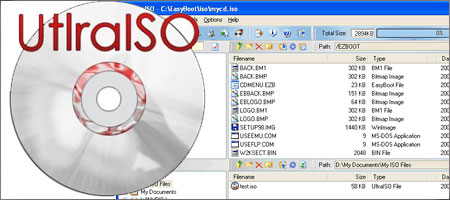
UltraISO Premium Edition 9.36 [Mediafire]


UltraISO Premium Edition 9.36|
ULTRA ISO เป็นโปรแกรมที่ใช้สร้างไดรฟ์จำลอง/แก้ไข/แปลงข้อมูลอิมเมจไฟล์ (Image File) .ISO,.BIN, .IMG, .CIF, .NRG, .BWI หรือบางครั้งอาจจะเรียกว่าเป็นไฟล์ ISO (ISO File)


UltraISO can extract, create, edit, and convert CD/DVD image files. It can directly edit ISO files,
make images from CD/DVD-ROMs, or create a new one from files and folders on your computer.
In addition, UltraISO can convert nearly all known CD and DVD image formats to ISO, BIN/CUE, Nero (NRG),
Alcohol 120%(MDS/MDF) and CloneCD (CCD/IMG/SUB) formats, as well as burn CD/DVD images directly
through Nero Burning ROM or Microsoft cdburn/dvdburn utility. UltraISO can be used as an ISO and BIN
extractor, creator, editor, and converter with most CD/DVD-burning software and virtual CD/DVD drive
software, which works like WinISO but are more stable.


*** UltraISO can:
1. Duplicate disc to ISO file from CD-ROM.
2. Build file on hard disk, CD-ROM, net drive to one ISO file.
3. Extract files from ISO file.
4. Edit ISO file in many format (such as Nero burning ROM, Easy CD Creator, CDRWin, CloneCD, BlindWrite, etc.).
5. Make bootable ISO file.
6. Create/Edit Audio CD image.


*** Some details:
01. Can directly edit the ISO image file.
02. Can directly extract files and folders from ISO image file
03. Can add / delete /create new directory /rename ISO file image content.
04. Can make ISO file from hard disk document.
05. Can create CD image from CD-ROM, maintain bootable information.
06. Can process the compact disc boot information, you can directly
add/remove/extract boot image of the ISO image.
07. Supports nearly all known CD image file formats (.ISO, .BIN, .IMG, .CIF, .NRG, .BWI and so on) ,
and converts them to the standard ISO form image.
08. May directly set the file/folder to hidden attribute
09. Supports ISO 9660 Level1/2/3 and Joliet extension
10. Automatically optimizes the ISO image file structure, saves the CD space.
11. Supports the shell document type integration, Open Image files through double clicking
them or the Right Click menu of the mouse with the open dialog.
12. The double window user interface is extremely convenient to use.
13. There are rich add-on tools, you can create ALL in 1 bootable compact discs, CD image file
management, even the virtual CD/DVD drive, those functions are really powerful.


OS: Windows 7/2008/Vista/2003/XP (32bit and 64bit), Windows 2000, ME, 98SE, 98, NT4


DOWNLOND
Read More | ความคิดเห็น

Folder Lock v6.6.0 [Mediafire]


Lock Folder ซอฟต์แวร์รักษาความปลอดภัยของไฟล์ที่สามารถป้องกันด้วยรหัสผ่าน, ล็อคซ่อนและเข้ารหัสจำนวนไฟล์, โฟลเดอร์, ไดรฟ์, รูปภาพ, เอกสารและใด ๆ ในไม่กี่วินาที ล็อกไฟล์ที่มี undeletable, unrenamable, unmovable ซ่อนและไม่สามารถเข้าถึงได้ คุณสามารถล็อคหรือเข้ารหัสรักษาความปลอดภัย ล็อคโฟลเดอร์แบบพกพาอย่างเต็มที่เพื่อให้คุณสามารถป้องกันไฟล์ของคุณใน USB แฟลชไดรฟ์ดิสก์, CD - RWs


Features:
• Users have an option whether to Encrypt or Lock, choices useful for both power users and casual users. Those who want ultimate security, can choose encrypiton. those who want ultimate speed, can choose locking.
• There’s no longer the hassle of encrypting each and every file on different locations. Think how much time you will save simply by putting all your files and folders in one location. Convenient encryption and decryption happens on-the-fly.
• Both Encryption and Locking are exceptionally fast. No competitor is offering this speed while offering 100% secure 256-bit AES Encryption.
• The Lockers can’t be deleted on the computer where Folder Lock is installed and Folder Lock can\t be uninstalled without the correct password.
• Users who want to password protect folders on multiple locations on their hard disk, not just on the C: drive, can easily protect their files on another partition by copying the \Lockers\ from one place to another or by simply using the \Lock\ feature.
• Secure and very strong Encryption. A strong industry standard 256-bit AES Encryption is used to encrypt your files for maximum protection. It is one of the most trusted encryption algorithms used in United States Military.
• Folder Lock offers fully portability and it can even protect CD/DVD-RW, not just USB Flash Drive, Memory Stick and floppy disks. To protect data on these drives, you can simply copy or burn your Locker to that drive.
• Lockers can also be emailed to someone over the internet. They won\t be able to see your encrypted files without your password / permission. Even if someone breaks through and checks your email attachment in between, he won\t be able to decrypt or use this information without the correct password.
• Folder Lock works flawlessly on all Next Technology Windows, i.e. Windows Vista / 2003 / XP / 2000 / NT. It is also fully compatible on all disk drives types including FAT16, FAT32, NTFS and EFS.
• You can increase the size of your Locker by simply adding more files and folders into your Locker. Even if you are left with little space in your Locker, you can always increase its size.
• Brute force cracking is not possible, since the program delays for some time once a password is entered. This will prevent hackers who may try many different combinations of passwords to get through your files. The program also produces a load beep when an incorrect password is entered, to alert the administrator of possible hack attempt.
• Password Strength meter shows you the strength of the password as you type, while you\re setting a new password. Basic rule of thumb is to use a password that is easy to remember but hard one to guess.
• Folder Lock doesn\t save the password in the registry or the disk, preventing hackers and crackers.
• Folder Lock also offers Auto Protect and Auto Shutdown features, this setting automatically locks or shutdown if more than five incorrect passwords are entered to try to decrypt the files.
• Folder Lock erases tracks of users when they click the lock button. It deletes recent document history, find file and folder history and the data in clipboard when you close the Locker.
• Protects important files from viruses, hackers, crackers, trojans, malware, spyware, worms, malicious programs and scripts. Protects files from network computers if you do not want to share files on network. Also protects files from hacker tools when you connect to the internet.
• While using the Lock feature, users can choose to lock and hide their files simultaneously. Locked and Hidden files are unrenameble, undeletable, unmovable and totally inaccessible. There is no limit to the size of data or the type of files you can protect.
• With its reduced file size and compact design, Folder Lock takes only 3.5 MB of hard disk space - small, portable and easy to keep. Thanks to the latest compression techniques. The GUI and interface is so well designed, it looks like an integral part of Windows XP.
• Folder Lock isn\t required to run at all times. Moreover, it doesn\t save anything to the registry/run so that users do not have any memory problems or stability problems with the program.


Home: http://www.newsoftwares.net/folderlock/

DOWNLOND
Read More | ความคิดเห็น

โปรแกรมเปิดไฟล์ ISO UltraISO Premium Edition 9.5.0.2800+Serial


Along with large capacity hard disk popularity, people were already used 

to coping compact discs to CD/DVD image files (also called compact disc 

image document) , generally used is the famous ISO 9660 international 

standards format, therefore CD/DVD image files are called ISO files.


Because the ISO file retained complete data information of the compact disc 

(including compact disc boot information), you were allowed the convince to 

use commonly used CD burning software (for example Nero-Burning ROM ) to 
record the disc with your CD-R/RW over and over forever, it can also be used 
directly through Virtual CD-ROM drive software (for example SoftDisc).


UltraISO is a CD/DVD image file creating/editing/converting tool , it can 

directly edit the CD/DVD image file and extract files and folders from it, 

as well as directly make ISO files from your CD/DVD drive or hard disk. At 
the same time, you can maintain the ISO bootable information, thus creating 
your own bootable CDs and DVDs. You now have the power to make and edit your 
own ISO files, and then burn them to CD or DVD for your own needs. 


UltraISO is in sole possession of the intellectualized ISO document format 

analyzer, it can process at the present time almost all types of image files, 

including ISO and BIN, it may even support new image files which are yet to be 
created. UltraISO can open these image files, directly extract files and folders, 
edit it and convert other image files to the standard ISO format. 


UltraISO uses the double window unification user contact interface, you have the 

choice to only use the quick buttons and/or the mouse Drag & Drops, you can 

handle any CD/DVD image file easily.


Here are some key features of "UltraISO":


- Can directly edit the ISO image file. 

- Can directly extract files and folder from ISO image file

- Can add / delete /create new directory /rename ISO file image content. 
- Can make ISO file from hard disk document. 
- Can create CD image from CD/DVD-ROM, maintain bootable information.
- Can process the compact disc boot information, you can directly add/remove/extract 
boot image of the ISO image. 
- Supports nearly all known CD image file formats (.ISO, .BIN, .IMG, .CIF, .NRG, 
.BWI and so on) , and converts them to the standard ISO form image. 
- May directly set the file/folder to hidden attribute 
- Supports ISO 9660 Level1/2/3 and Joliet extension 
- Automatically optimizes the ISO image file structure, saves the CD space. 
- Supports the shell document type integration, Open Image files through double 
clicking them or the Right Click menu of the mouse with the open dialog.
- The double window user interface is extremely convenient to use.
- There are rich add-on tools, you can create ALL in 1 bootable compact discs, CD image 
file management, even the virtual CD/DVD drive , those functions are really powerful.


================================================================================


Multilingual:


42 Different language support.


1. Western:


Albanian, Breton, Catalan, Danish, Dutch, English, Faroese, Finnish, French, Gaelic, 

German, Icelandic, Irish, Italian, Norwegian, Portuguese, Spanish and Swedish


2. Central European:


Croat, Czech, Hungarian, Polish, Romanian, Slovak, Slovene and Sorbian


3. Baltic:


Estonian, Latvian and Lithuanian


4. Turkish:


Kurdish (Latin) and Turkish


5. Slavonic Cyrillic:


Bulgarian, Belorussian,Macedonian, Moldavian, Russian, Serbian and Ukrainian


6. Others:


Greek, Hebrew and Arabic 


================================================================================


System Requirement:


. Windows 7/2008/Vista/2003/XP (32bit and 64bit), Windows 2000, ME, 98SE, 98, or 

Windows NT4.0 SP6a+ operating system.


. Intel Pentium 166MHz or above.


. 64MB memory.


. At least 10MB free hard disk space.


. CD-ROM, CD-R/RW, DVD-ROM, the DVD-R/RW driver (copy compact disc image needs).


================================================================================


How to Install:


1. Disable your internet connection


2. Extract from ".rar" file by using Winrar


3. Install from "uiso9_pe.exe"


4. Run the program


5. Register the program with any one of the given Serial Key (Help>>Register)


6. OK


Read More | ความคิดเห็น
 
Copyright © 2011. misaha-program . All Rights Reserved.
Company Info | Contact Us | Privacy policy | Term of use | Widget | Advertise with Us | Site map
Template modify by Creating Website. Inspired from Maskolisfree download all